This is a walk down that stack, from the silicon up. What each layer actually enforces, what it deliberately does not, and where the seams between layers are — because that is where the interesting bugs live.
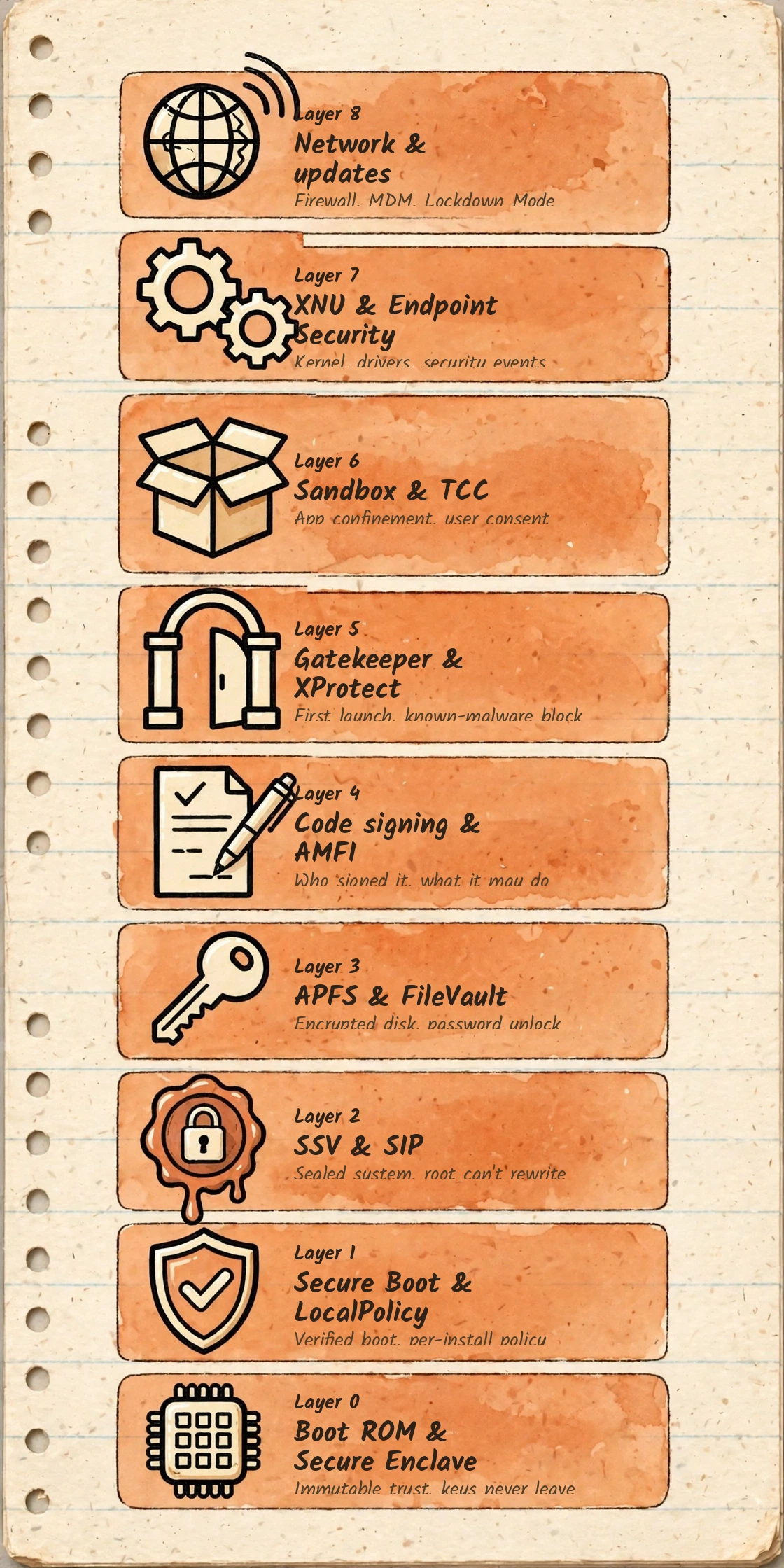
No single shield — a chain of independent controls
Read macOS security bottom-up and a pattern emerges. Every layer answers a different question, and no layer is asked to answer two of them. The hardware answers can I trust this code to hold keys? Secure Boot answers did the operating system that started come from Apple, intact? Code signing answers who made this binary, and has it changed since? Gatekeeper answers may this new program run for the first time? The sandbox answers if it runs, what can it reach? TCC — Transparency, Consent and Control — answers did the user agree to it touching this specific thing?
That separation is the design. A valid signature does not imply a program is benign. A TCC grant does not validate what an app does with the data afterwards. A sandboxed app is not automatically trustworthy, and an unsandboxed one is not automatically malicious. When an analysis collapses these into "the app is signed, so it is safe", it has already missed the point — and, in research terms, missed the bug class.
The stack, top to bottom. The rest of this piece walks it from the bottom up, in the order trust is actually established at power-on.
The one-sentence version: each layer catches what the layer before it cannot — Secure Boot starts only an Apple-signed system, SIP and the seal keep that system read-only even for root, Gatekeeper judges new code at first open, the hardened runtime and sandbox confine it while it runs, TCC asks before it touches your data, and FileVault makes the disk unreadable without you.
Trust starts in silicon, before any software runs
Boot ROM & Secure Enclave
The chain starts in code that cannot be changed. The Boot ROM is mask-programmed into the chip at manufacture and contains Apple's root certificate authority key. Because it is immutable, it is the one piece of the system that does not need to be verified by anything else — it is the verifier. Everything booted after it is checked against it, stage by stage.
Beside the main processor sits the Secure Enclave: a separate, hardened coprocessor with its own boot chain, its own encrypted memory, and a hardware unique ID fused into it that even Apple does not record. Keys are generated and used inside the Enclave and are designed never to leave it in usable form. Biometric templates, the keys that unwrap FileVault, and the owner identity that signs boot policy all live on that side of the wall. Stealing the disk, or fully compromising the main operating system, does not by itself hand over those keys.
Apple silicon adds two runtime assists worth naming. Pointer Authentication Codes cryptographically sign pointers in memory, so a corrupted pointer tends to crash a process instead of redirecting it — raising the cost of memory-corruption exploits rather than eliminating them. And on Apple silicon, internal storage is always encrypted at the hardware level; what changes with FileVault is who can authorise key release, covered in Layer 3.
Secure Boot & LocalPolicy
On Apple silicon there is no single global "secure boot on/off" switch. Each installed macOS has its own LocalPolicy: a signed policy object, authorised by the owner identity held in the Secure Enclave, stating how strictly that particular installation must be verified. That is why the same machine can run one volume at Full Security and another at Reduced Security.
| Policy | What it means in practice |
|---|---|
| Full Security | The iOS-style model. The system must carry a personalised signature for this specific machine, fetched at install time. Downgrading to an older, known-vulnerable release is refused because Apple stops signing it. |
| Reduced Security | The boot chain is still verified, but against the global signature shipped with macOS, so older signed versions can run. Required for some third-party kernel extensions. |
| Permissive Security | The chain is still checked, but locally signed objects — including a custom kernel — are accepted. Required before SIP can be turned off at all. |
The practical consequence for research: boot policy is a per-install, owner-controlled decision, changed from recoveryOS — the paired "one true" recovery environment reached by holding the power button — not from a booted system. Malware running as root in a normal session cannot quietly lower it.
The system volume is sealed — and root is not exempt
SSV & SIP
Since macOS 11, the system does not boot from the volume you see. It boots from a cryptographically sealed snapshot of it. Every file on the system volume is hashed, those hashes form a tree, and the root of that tree — the seal — is signed by Apple and verified at install, at update, and at boot. Change one byte in one system file and the seal no longer matches.
System Integrity Protection (SIP), present since OS X 10.11, is the complementary half. It is a mandatory access control policy enforced by the kernel on every process — sandboxed or not, root or not. Protected locations such as /System, /usr, /bin and /sbin, plus preinstalled Apple apps, can only be modified by Apple-signed processes carrying specific entitlements: essentially, software update and the installer. SIP also restricts runtime injection into system processes and blocks unsigned kernel code.
SIP stops writes; the seal detects them. Neither replaces the other. SIP is a live policy decision at the moment of access. The seal is evidence after the fact that what booted is exactly what Apple shipped.
Updates exploit the same machinery: a new system is written beside the old one, sealed, and the machine boots the new snapshot. If an update fails, the previous sealed snapshot is still there to fall back to. The writable part of the machine is a separate Data volume, firmlinked into the sealed system so paths look unified to the user — but the two trust domains stay distinct.
APFS & FileVault
On Apple silicon and T2 machines the storage is encrypted whether or not FileVault is on, with keys handled by the Secure Enclave. In that state the hardware key alone can unwrap the data, which protects against a chip being read raw but not against the machine simply being booted and used.
Turning FileVault on changes the key hierarchy: release of the volume key becomes bound to a user's login password, entangled with the hardware unique ID inside the Enclave. Now a powered-off Mac is genuinely closed — the disk moved to another machine is ciphertext, and offline password guessing is throttled by the Enclave rather than by an attacker's GPU farm. Recovery is through the user's Apple Account or a personal recovery key, which is why losing both is final.
What FileVault does not do is just as important: once the volume is unlocked and a session is running, it offers no protection at all. It is a control for data at rest — theft, disposal, and forensic imaging of a switched-off machine — and it should never be cited as a defence against malware in a live session.
Every executable has a cryptographic identity
Code signing & AMFI
Unix traditionally asks only whether a file has its execute bit set. macOS asks a harder question: who signed this code, and is what is about to run bit-for-bit what they signed? On Apple silicon the point is absolute — native code must carry at least an ad hoc signature to execute at all. There is no unsigned native code path.
Code signing and the Code Directory
A signature is more than a certificate stapled to a binary. The compiler builds a Code Directory: a hash of every page of the executable, plus hashes of the app's resources, its Info.plist, and — critically — its entitlements. The whole structure is signed. Pages are validated as they are faulted into memory, so modifying code on disk after signing breaks validation when the tampered page loads, not just at first check.
AMFI — the enforcement point
Apple Mobile File Integrity (AMFI) is the subsystem that turns signing policy into kernel decisions: whether an executable may run, whether a page of code is valid, whether dynamic code is acceptable, and whether a process holds an entitlement it claims. When researchers talk about a "code signing bypass", they usually mean a gap between what AMFI believes about a process and what is actually running — a mismatch in that one place undermines Gatekeeper, sandbox exceptions, and TCC attribution all at once, because all three key off code identity.
Entitlements — capabilities inside the signature
Entitlements are key-value claims embedded in the signature itself, which is why they cannot be added by editing a plist on disk. A camera entitlement, a sandbox exception, the right to load a system extension — each is granted by whoever signed the code, and for the most sensitive ones, only by Apple. The audit question is never just "is it signed?" but "signed by whom, with which entitlements, and does the checking code validate the caller or merely assume it?" XPC services that skip that validation are a recurring source of privilege-escalation bugs.
The hardened runtime
Opting into the hardened runtime closes the classic runtime attacks on a signed app: another process injecting a library into it, it loading unsigned plug-ins, or a debugger attaching without entitlement. Exceptions exist — an app can declare that it needs to allow unsigned executable memory for a just-in-time compiler, for example — but each exception is itself a signed entitlement, visible to anyone who inspects the binary. That inspectability is the point: the security posture of a Mac binary is, unusually, something you can read off the file.
codesign -dvvv --entitlements :- /Applications/Example.appcodesign --verify --strict --verbose=4 /Applications/Example.app
Reading a signature and its entitlements, and verifying it strictly — the first two commands in any serious look at an unfamiliar Mac binary.
First launch is a checkpoint, not a formality
Gatekeeper & XProtect
Apple describes Mac malware defence as three distinct jobs: prevent launch, block execution, and remediate what already ran. Three different mechanisms do those jobs, and conflating them — "Gatekeeper will catch it" — is the most common error in casual macOS security writing.
Quarantine — remembering where a file came from
When a browser, Mail, Messages or AirDrop delivers a file, the receiving app attaches an extended attribute: com.apple.quarantine. That attribute is the trigger for everything that follows. It propagates to files extracted from an archive, and it is why the same binary behaves differently when it arrives by download versus when it is built locally — local builds were never quarantined, so first-launch policy was never meant to judge them.
Gatekeeper and notarization — the launch decision
At first open of a quarantined app, plug-in, or installer package, Gatekeeper checks the Developer ID signature — is this from an identified developer, unaltered? — and, since macOS 10.15, whether the software was notarized. Notarization is an automated submission to Apple: the software is scanned for known malicious content and signing problems, and Apple issues a ticket that can be stapled to the app or checked online. It is explicitly not App Review; nobody at Apple judged what the program does, only that it was not known malware when submitted. A revoked developer certificate or a revoked notarization ticket closes the gate for every Mac, which is what makes the system a kill switch, not just a warning dialog.
XProtect — the known-malware block and the cleanup
XProtect is the built-in signature-based layer: YARA rules, updated separately from operating system releases, applied when an app first launches, when an app changes on disk, and when the rules themselves update. A match is blocked and the offending item is moved to the Trash with a plain-language notification. A second XProtect component handles remediation — removing known infections that did execute, including in periodic background runs. Neither component claims to judge unknown malware; behaviour-based detection is deliberately left to the Endpoint Security ecosystem covered in Layer 7.
The honest limit: a signed, notarized app can still be vulnerable, still be sold to a bad owner, or still abuse permissions the user grants it. Gatekeeper establishes provenance and known-clean status at submission time. It does not certify intent — and any workflow that treats it as if it does has a hole exactly the shape of that assumption.
xattr -p com.apple.quarantine ~/Downloads/Example.appspctl --assess --verbose /Applications/Example.app
Three gates at runtime — and passing one proves nothing about the others
Sandbox & TCC
The App Sandbox — Seatbelt in the kernel
A sandboxed app carries the com.apple.security.app-sandbox entitlement and runs under a Seatbelt profile enforced by the kernel. By default it can reach its own container and very little else: not your Documents, not other apps' data, not most of the system. Access beyond the default is itself granted through entitlements — temporary file exceptions, network client or server rights, device access — each declared in the signature. The user's own choices are bridged by system dialogs: the standard Open and Save panels run outside the sandbox, so a user picking a file is the authorisation, without the app ever gaining broad filesystem rights.
Sandboxing is mandatory for Mac App Store apps and optional — though increasingly normal — for Developer ID apps. That optionality matters: the absence of a sandbox is not a policy violation, which is why "it ran, therefore it was confined" is never a safe inference on macOS.
TCC — consent as a separate database
Transparency, Consent and Control guards a different set of things entirely: not what code may do in general, but whether this app may touch this protected resource — camera, microphone, screen recording, accessibility control, contacts, calendars, location, and the Desktop, Documents and Downloads folders, among others. Decisions are recorded per app, keyed to its code identity, in a protected database managed by the tccd daemon. A user grant survives because it is bound to the signature, not the file path — and a changed signature can invalidate it, which is a feature.
In managed environments, Privacy Preferences Policy Control (PPPC) profiles let an administrator pre-decide some of this — with an asymmetry worth remembering: for the most sensitive categories such as camera and microphone, a profile can deny but cannot silently grant. Only the person at the machine can say yes.
Plain Unix, still load-bearing
| Gate | Question it answers | Failure mode if treated as the only gate |
|---|---|---|
| POSIX permissions and ACLs | Does this user own, or have rights to, this file? | Any process running as you inherits all of it — including malware. |
| Sandbox profile | Is this process allowed to attempt this operation at all? | Unsandboxed apps are outside it entirely. |
| TCC | Did the user consent to this app using this protected resource? | A grant is broad and persistent; it does not police what happens next. |
Read together, the three explain most real-world outcomes. A process running as your user, unsandboxed, with a Full Disk Access grant, can read almost everything you can — not because any layer failed, but because each layer was asked its own question and answered yes.
Out of the kernel, into entitled user space — and kept current
XNU & Endpoint Security
At the centre sits XNU, the hybrid Mach/BSD kernel. Historically, third-party drivers ran inside it as kernel extensions, where a bug in a vendor's network driver was a kernel bug. Apple's direction for a decade has been eviction: DriverKit, Network Extension, and Endpoint Security move that code into user-space system extensions — separately signed, entitlement-gated, individually revocable, and crash-contained. A modern Mac can run with no third-party kernel extensions at all, and on Apple silicon loading them requires deliberately lowering boot security first.
Endpoint Security is the sanctioned observation point that replaces the old kernel hooking free-for-all. Entitled clients — the framework behind most Mac EDR products — subscribe to structured events about process execution, file operations, and similar activity. Some events are notifications; others are authorisation events the client must answer within a deadline, which is how a security tool can block an execution rather than merely log it. Endpoint Security itself is not an antivirus: it is a controlled API, gated by entitlement and user approval, through which security products watch the layers above it.
Network & updates
The top layer is operational. The application firewall controls incoming connections per app; network extensions provide per-app and system content filtering without kernel code; and Lockdown Mode offers an extreme, opt-in profile — sharply reduced web functionality, message attachment types, and wired accessories — for the small number of users facing targeted, sophisticated attack.
Management is part of the security model, not an add-on. MDM can enforce FileVault, firewall, Gatekeeper policy, PPPC decisions, and update timing, and can escrow recovery keys so encryption survives a forgotten password in a fleet. Declarative management and Background Security Improvements, introduced in macOS Tahoe 26.1, let Apple deliver security fixes and configuration faster than a full operating system release cycle. You can check them under System Settings > Privacy & Security > Background Security Improvements.
Updates deserve emphasis because they are the layer every other layer depends on. The sealed system, the personalised signatures that refuse old releases, XProtect content delivered apart from the OS, and notarization revocation all exist so that a fix, once shipped, actually displaces the vulnerable state — and cannot be quietly rolled back by an attacker who has already gained a foothold.
For a lab machine, the operational rule follows directly: keep a research guest at a deliberately old, vulnerable build for study — but never let that become the posture of a daily-driver Mac. The model assumes current software; running it unpatched is not testing the layers, it is removing one.
Where the layers fail — and how to verify every one of them
The cryptography in this stack is rarely the weak point. Real macOS vulnerabilities cluster at the seams, where one component has to trust another's word. Four patterns recur often enough to organise a study programme around:
- Entitlement checks that are missing or mis-scoped. A privileged XPC service that performs work for any caller, or checks the caller's name rather than its code signature, turns its own entitlements into everyone else's.
- Confused deputies between layers. A trusted, entitled Apple process persuaded to act on an untrusted app's data — parsing it, loading it, or writing it somewhere protected — bridges the very gap the layers were built to keep.
- Consent inheritance and attribution errors. TCC decisions keyed to the wrong responsible process let one app ride on another's grant.
- Policy exceptions that outlive their reason. Hardened-runtime exceptions, sandbox temporary exceptions, and broad Full Disk Access grants are each legitimate — and each is a standing widening of the attack surface.
That is study guidance for systems you own and for Apple's published bounty scope — map a daemon's entitlements, its XPC interface, and its validation of callers before reaching for anything more exotic. In macOS research, the front door is usually more productive than the wall.
Verify it yourself — read-only, nothing weakened
csrutil status # SIPspctl --status # Gatekeeperfdesetup status # FileVaultsystemextensionsctl list # system extensions, not kextscodesign -dvvv --entitlements :- /path/to/binary
TCC has no command-line read — check it in System Settings > Privacy & Security instead.
Every layer in this piece leaves a checkable artefact like those above. That, in the end, is the most Unix thing about the whole design: for all its signed policies and sealed volumes, macOS still expects an administrator who can open a terminal and ask the machine what it believes — and who knows that the answer is only trustworthy if they also know which layer produced it.
Sources
Apple Platform Security Guide — Secure Enclave, secure boot, Signed System Volume, System Integrity Protection, FileVault, code signing, app sandbox and TCC chapters (support.apple.com/guide/security). Apple Support, "Safely open apps on your Mac" — Developer ID, notarization and Gatekeeper checks, support.apple.com/en-us/102445. Apple Support, platform security overview — malware defence in three layers: prevent launch, block execution, remediate, support.apple.com/…/sup14ec703ce. Command examples are standard macOS administrative tools; run them read-only on your own machine.